Mum’s week or Dad’s week?
Shared parenting calendar – clear for the children and both parents
Choose the schedule – alternating weeks, 2-2-3, 2-2-5-5 or your own – and add the holidays. In two minutes you have a clear year calendar to print and the same calendar on both parents’ phones, in our Android app or in Google or Apple Calendar.
No sign-up needed. You only log in to save it.
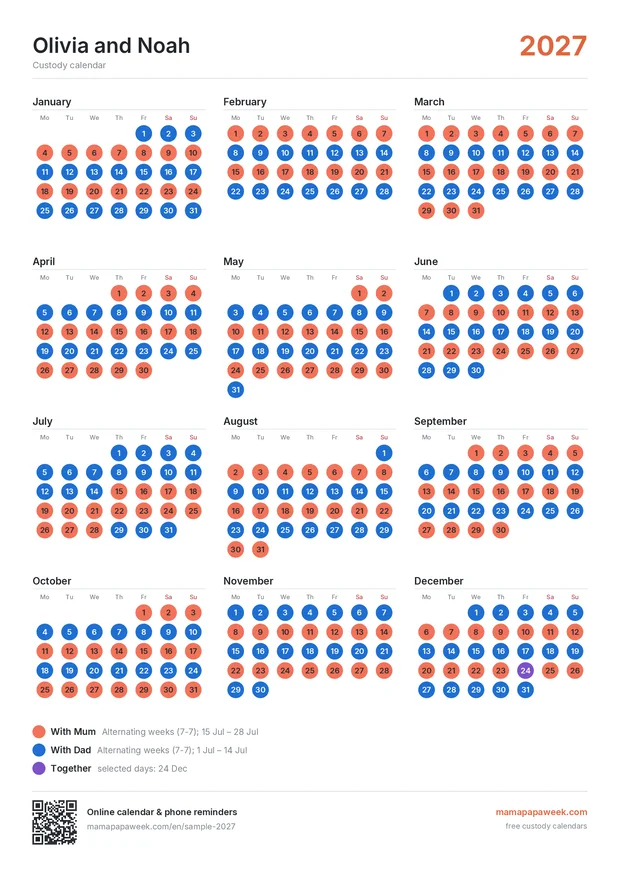
Set up the schedule
Pick the schedule, the start date and who begins. Add holidays and special days.
Download the PDF
Year overview for the fridge or large half-year pages – exactly A4.
Share it
Both parents add the calendar to their phone; changes appear for both.
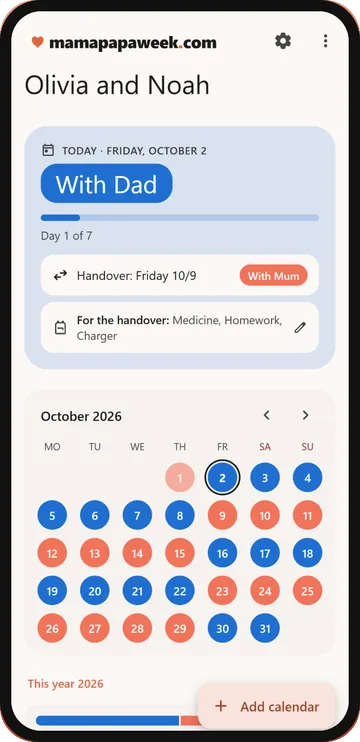
Android app
Where are the kids today and when is the handover? Your co-parenting schedule.
- At a glance: who has the kids today, which day of the block it is and when the next handover is
- Home screen widget with upcoming handovers
- A list of things for the handover (medicine, homework, charger…) – also shown in the reminder
- Swap a weekend or add holidays with one tap on the day
Choose your layout
Custody schedules
Which schedule suits your family?
How the most common shared parenting schedules work, who they suit and what they look like over a whole year.
Plans
Free
for one child’s schedule
€0 / year
- All schedules, holidays and swaps
- In both parents’ phone calendars
- Print-ready PDF in all layouts
- 1 saved calendar
Family
for both parents – shared editing and change history
€19 / year
≈ €1,58 per month
Everything in Free, plus:
- 5 saved calendars
- The other parent can edit too
- Change history – who changed what and when
- Note on the print (handover place, contacts)
- No mamapapaweek.com footer on prints
Guides and comparisons
- A free OurFamilyWizard alternative – for the schedule part
- A free 2houses alternative for your custody calendar
- 50/50 custody schedules compared
- Custody percentage by overnights – the chart
- Christmas custody schedule
- Summer holiday custody schedule
- Parenting plan checklist
- A shared custody calendar on both parents' phones
Frequently asked questions
Is it free?
Yes. You can create the calendar, download it as a PDF and add it to your phone for free and without registering. You only sign in with Google to save it. The paid plan is for several calendars without ads.
Which schedules are supported?
Alternating weeks (7-7), 2-2-3, 2-2-5-5, 3-4-4-3 and every other weekend. You can also set any custom rotation, holidays split between parents and individual days.
Can both parents have the calendar on their phone?
Yes. Save the calendar and click “Add to phone” – each parent adds it to their Google or Apple Calendar. When you change it, both phones update automatically.
How do I set the holidays?
Click “Add holidays”, choose the parent and enter the dates – on those days it replaces the regular rotation.
Does the calendar replace a court decision or an agreement?
No. It is a tool for clarity and planning, not legal advice. The court decision or the parents’ agreement is always binding.
What data do you store about the children?
Only what you enter: the calendar name and the days. You don’t need surnames, dates of birth or other details. The calendar is not in search engines and only people with the link can see it.